TripAI app icon

TripAI

Reality-checked trip planning

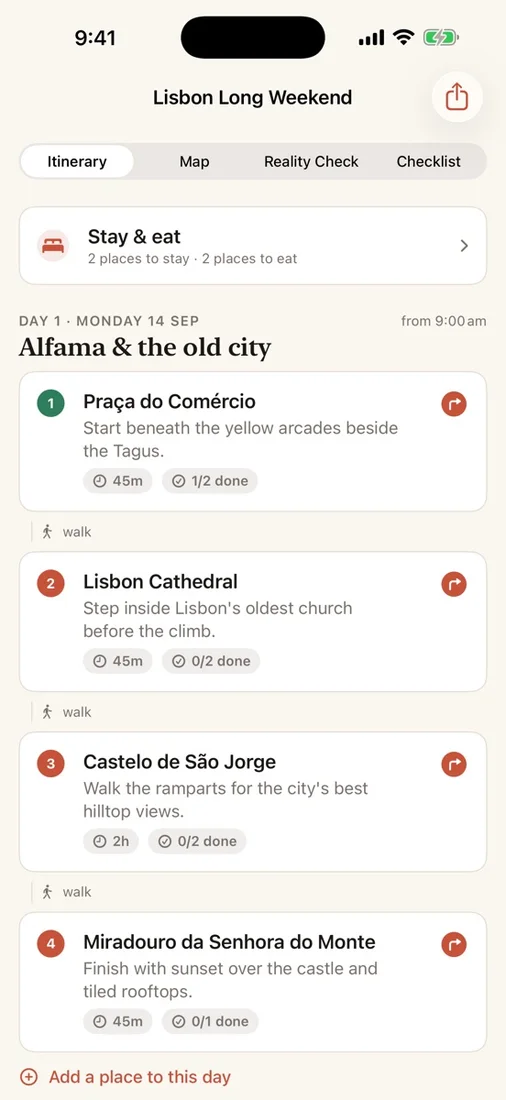
Build a day-by-day itinerary that maps every stop, fits the time you have, and stays private.

Download on the App Store
?

The Problem

A travel wish list can look perfect until transfers, opening hours, and overpacked days make it impossible in practice. Generic itinerary tools often skip that reality check or expect you to hand trip details to another online account.

The Solution

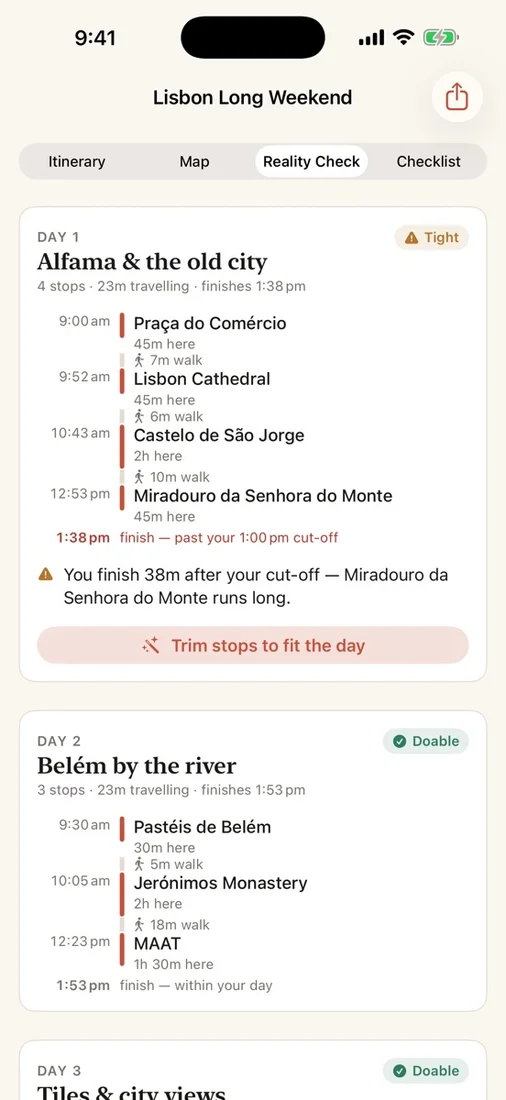
TripAI resolves places through Apple Maps, estimates travel time, and lays each day out on a clock with a clear Doable, Tight, or Not possible verdict. Adjust stops, trim overloaded days, organise activities and packing, and keep the trip on your devices.

What you get

Private itinerary intelligence

Create destination-specific itineraries with Apple’s on-device model when available, without sending your trip prompts to the developer.

A reality check for every day

See a Doable, Tight, or Not possible verdict based on real travel-time estimates, with clear explanations of schedule problems.

Trim overloaded days to fit

Apply the smallest practical cuts to bring an overpacked day back under control instead of rebuilding the itinerary yourself.

Every stop mapped

Places are resolved through Apple Maps before they reach your itinerary, then shown in order with routes and turn-by-turn navigation.

Flexible trip details

Tick off activities, add notes, change visit durations, search for places, and build a packing checklist grouped by category.

Private, optional iCloud sync

Keep trips locally or sync encrypted trip fields through your private iCloud database across iPhone and iPad, with no TripAI account.

Questions

Does TripAI send my itinerary prompts to the developer?
No. When Apple’s on-device model is available, prompts and generated text stay on your device. A built-in planner takes over when that model is unavailable, and TripAI has no developer backend, advertising, or analytics SDK.
How does the reality check work?
TripAI uses travel-time estimates to place the day on a clock, gives it a Doable, Tight, or Not possible verdict, and explains issues such as long transfers or stops that are too short.
Can I use TripAI across my iPhone and iPad?
Yes. Optional iCloud sync keeps trips available across your devices through your private iCloud database. You can switch sync off and keep trips on the current device instead.

Try TripAI

Build a day-by-day itinerary that maps every stop, fits the time you have, and stays private.

Download on the App Store